Our content is impartial, but funded in part by affiliate commissions (at no extra cost to our readers). Learn more.
There is a huge number of online store building tools now available, and choosing the right one for your business can feel really difficult. Shopify is probably the best-known ecommerce solution available — but is it actually the best one for you? Well, in my Shopify review, I’m going to help you find out.
I’ll begin with a quick look at Shopify’s background.
The background behind Shopify — and how the platform works
Shopify was created in Canada in 2006 by German-born entrepreneur Tobias Lütke, who wanted to build an online store to sell snowboards with. Unhappy with existing store building solutions, he found himself creating his own — and then realised he could sell it to other people.
Fast forward to today, and his invention has generated over $1tn in sales and is used by millions of merchants in 175 countries. Shopify currently powers around 4.9 million online stores (source: Builtwith.com), and 8,300+ employees now work for the company.
Shopify was designed to be a ‘hosted’ solution — an app that it runs on its own servers, and one that doesn’t require any web hosting or software installation. You build and manage your Shopify store in a web browser — so, as long as you have access to the Internet, you can run a Shopify business from any location.
The platform aims to give you all the things you need to build and market an online store ‘out of the box’ — templates, a payment processor, a content management system, a blog and hosting.

Although its built-in features will generally cover most merchants’ core selling needs, it’s also possible to customize a Shopify store more extensively through the addition of apps or by using custom code (CSS, HTML or Liquid, Shopify’s own templating language).
Finally, because it’s a ‘Software as a Service’ (SaaS) product, you don’t own a copy of Shopify but instead pay a monthly fee to use it.
More on pricing later — but first, a look at visuals.
Shopify themes
Shopify provides 13 free ecommerce templates (or ‘themes’) that you can use as the starting point for your store design.
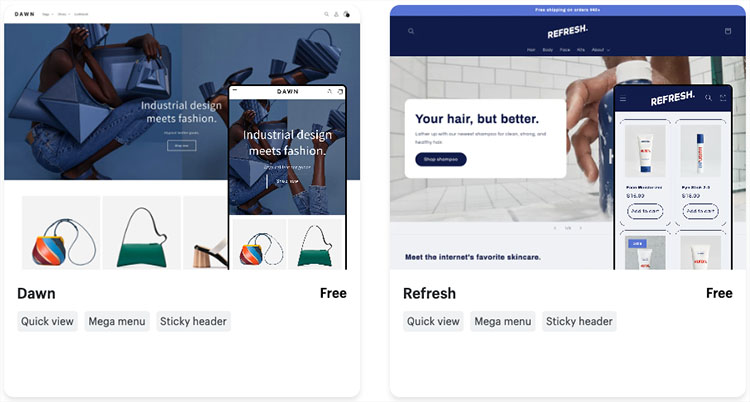
Now, by comparison to other ecommerce platforms I’ve tested, I found Shopify to be rather ungenerous here. For example, Wix and Squarespace provide 819 and 180 bundled themes respectively — giving you a lot more choice over your store’s appearance.
The free Shopify themes are attractive however, and they are fully responsive too, meaning that they will automatically adjust their layout to suit the screen size of the device they’re being viewed on — smartphone, tablet, desktop computer etc.

And, if the free templates don’t appeal, you can use a paid-for or ‘premium’ theme — at time of writing, 210 of these are available. Many of these premium themes are provided in a few variants, further extending the template choice available to you. The premium themes range in price from $100 to $500, and like the free ones are all fully responsive.
💡Tip: you can browse all the Shopify themes here.
In the Shopify theme store, you can explore all the free and paid templates using a range of filters, including:
- theme price
- industry type
- catalog size
- template features.
(See my screenshot below for a look at some of the categories involved.)
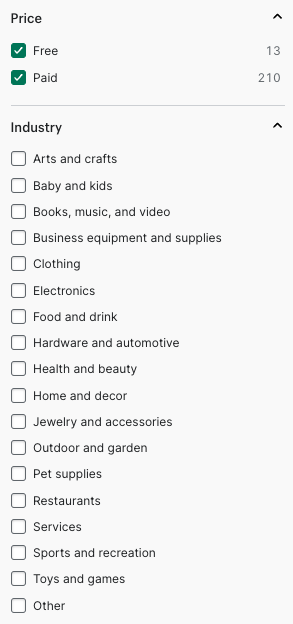
When building a test store using Shopify, I was able to use these filters to quickly find a template that worked for my needs.
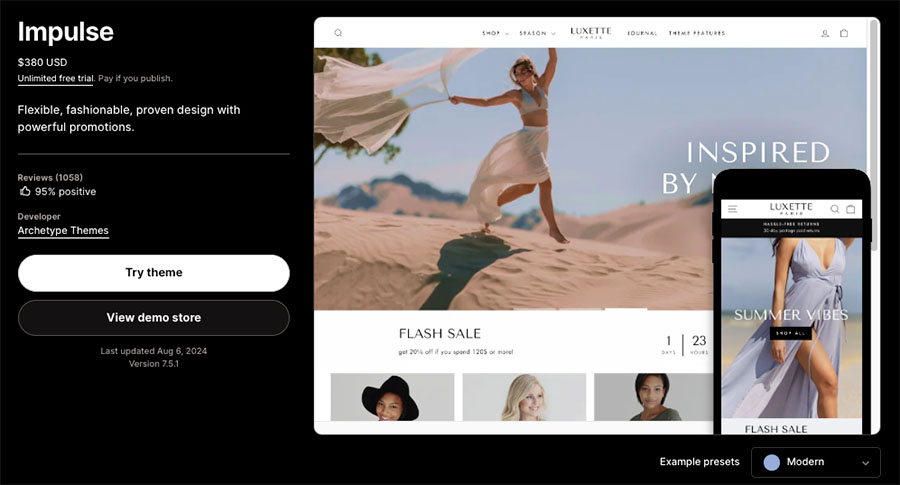
All in all, Shopify’s template offering is of a very high standard — but if you aren’t happy with the options provided, and wish to create something that is truly unique, there is always the option of building your own theme. It’s easy to access the Shopify theme code, and a lot of support materials and tutorials are provided to help you develop your own template or modify an existing one.
Now, once you’ve started a Shopify trial, picked your theme and decided upon a plan, you can focus on selling with the platform. So, let’s look at how easy it is to do that.
While you’re here — have you seen our video review of Shopify?
Special 3-month Shopify trial >
Interface and ease-of-use
Shopify is fairly easy to use – it’s got a modern, intuitive interface, and provides a generally good user experience (UX). As you can see from my screenshot below, a menu on the left-hand side of the screen allows you to access key features or content, which you can then configure or edit on the right.
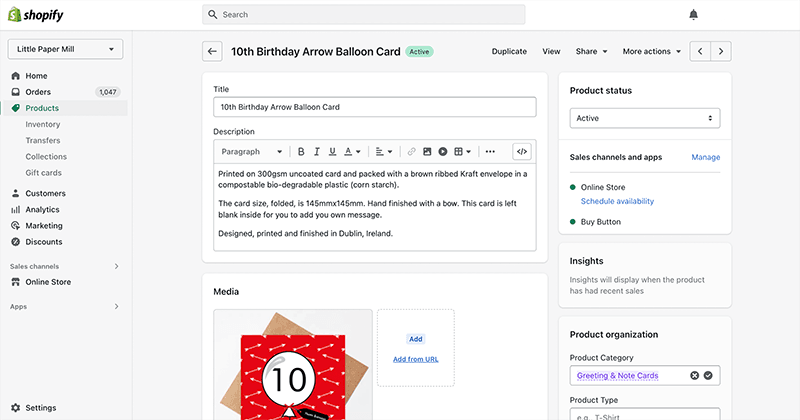
This layout is consistent with most of the other content management systems I’ve tested — WordPress, Squarespace, Wix etc.
The process of adding content can be sped up via a new AI feature, ‘Shopify Magic,’ which generates copy and product descriptions for you automatically (based on keywords and instructions you provide.)
The thing I like most about the Shopify interface is its product management features. When building a test store with the platform, I was able to import and export products via CSV file easily; I also found the processes for adding product descriptions and images extremely straightforward.
In particular, I found sorting inventory into product catalogs really easy, thanks to Shopify’s ‘smart’ collection features. These let you create catalogs automatically based on a keyword or tag — potentially saving you hours of data entry, particularly where large catalogs are involved.
(Take a look at my screenshot below to see how this works ).
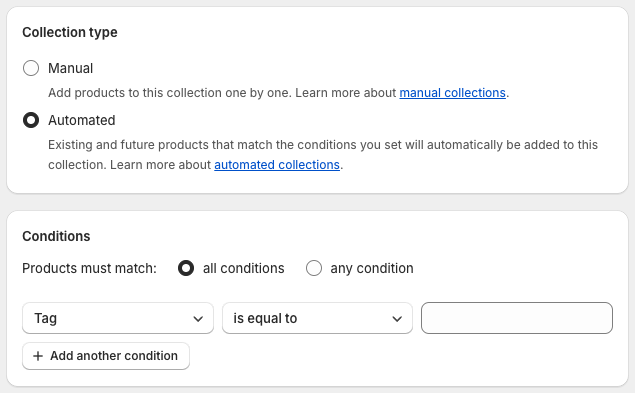
I haven’t come across a similar feature in any other competing platforms we’ve tested; so for me, this represents something of a USP for Shopify.
Sales channels
The Shopify interface lets you set up and manage a variety of ’sales channels’ — the different platforms where you sell your products.
Key ones include:
- An online store: your main website, which you host on your own domain name.
- Facebook: a section of your Facebook page where users can browse and buy your products.
- Buy Button: this channel allows you to add ecommerce functionality — via ‘buy buttons’ — to any website or blog.
- Instagram: this allows you to make your Instagram posts ‘shoppable.’
- Shopify’s ‘Shop’ channel — this allows you to make use of accelerated checkout features via the ‘Shop Pay’ system, and sell on Shopify’s Shop app.
- Wholesale: this lets you create a separate, password-protected storefront where you can sell products B2B (note: Shopify Plus customers only).
(Note: the above list covers the key sales channels that you can use ‘out of the box.’ Several others — including big-hitters like TikTok, Amazon, Ebay, Etsy and Pinterest — are available via third-party apps. A key option on that front is Shopify’s own Shopify Marketplace Connect app).
In general, I’ve found using these sales channels — and the Shopify interface in general — fairly easy. But there are a couple of problems I think it’s worth zooming in on, relating to content layout and images.
Content layout
Over the past couple of years, Shopify has been rolling out a new theme format, ‘Online Store 2.0’ (OS 2.0). This unlocks a lot of useful content presentation options that weren’t previously available in the platform.
Chief amongst these is a drag-and-drop builder (pictured below) that lets you add blocks and sections to page layouts, and move them around with ease.
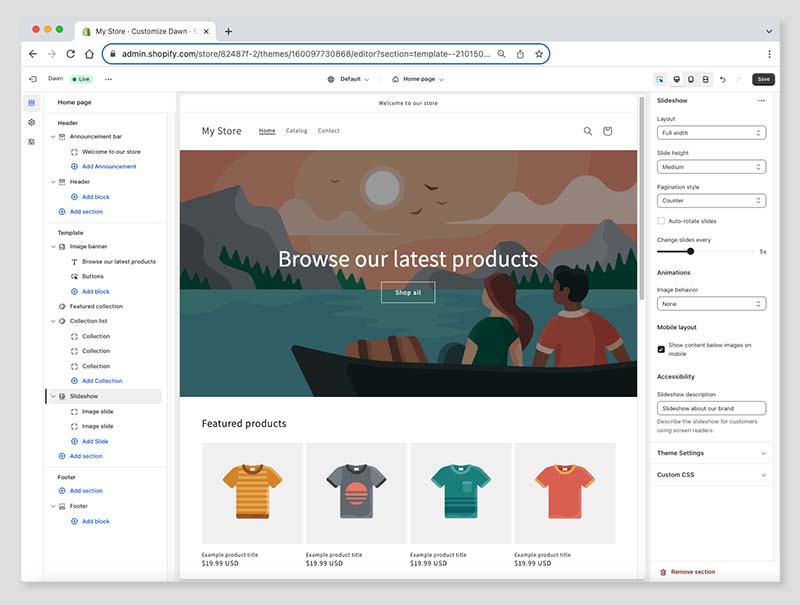
There’s a rather confusing aspect to page editing in Shopify’s OS 2.0 format, however.
In my tests I discovered that instead of using the drag-and-drop editor to change the content of your pages, you can only use it to edit page templates. You still have to edit page content using a basic WYSIWG editor (see screengrab below) — and then apply the relevant template you’ve designed to it.
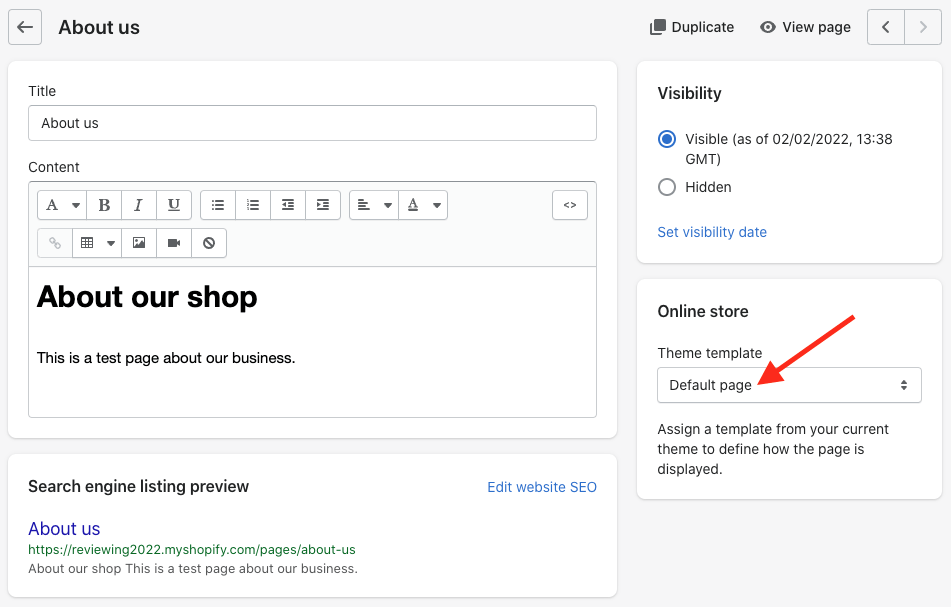
You get used to this, but it makes for a bit of an odd workflow!
Another improvement that I feel could be made to Shopify’s drag-and-drop editor involves forms — at the moment you can only drop a simple ‘contact’ or mailing list signup form into page templates.
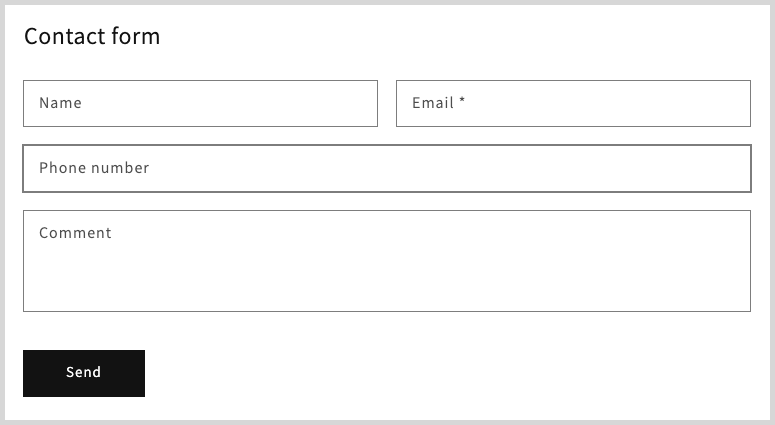
If you need to add custom forms to your Shopify store, you will need to resort to some coding, or the installation of an app.
It would be better, as is the case with competing platforms like Squarespace and Wix, if a built-in form builder was available for creating more bespoke forms.
Product images
Another headache I encountered with Shopify involved image aspect ratios.
When I uploaded images to Shopify with different ratios, I found that they they weren’t automatically cropped into a uniform one. My product catalogs ended up containing lots of differently-shaped images — something that led to a very messy-looking store.
You can get around this problem by cropping your all your images to a uniform ratio using a photo-editing app (like Canva or Photoshop) before you upload them. Alternatively, you can do this afterwards, using Shopify’s built-in photo editor (pictured below).

Other workarounds involve adding some code to your template to force images to display in a certain ratio, or using a paid-for Shopify app to standardize your image ratios.
My overall take on the Shopify interface is this: it’s great where product management is concerned — but rather clunky when it comes to managing general content. I’ve found that other platforms, especially Squarespace, offer a much nicer user experience here.
Working with products in Shopify
Product variants and options
Shopify allows you to create up to 100 different variants of a single product. I was a bit disappointed to discover however that these variants can only involve three product options.
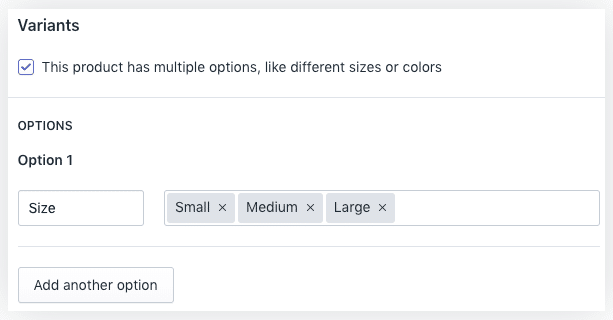
So, for example, if you were selling shoes, you could allow users to choose from up to 100 different versions of a particular shoe, each involving 3 different product options (i.e., color, size and style) — but you couldn’t let them pick a shoelace color on top of this.
On the plus side, these limits are set to be increased in the not-too-distant future: Shopify intends to let users work with a 2,000 variant limit in 2025.
In the meantime, a workaround exists involving third-party apps. There are quite a few available (like ‘Infinite Options,’ pictured below) that lift these limits, but you will need to pay for them.
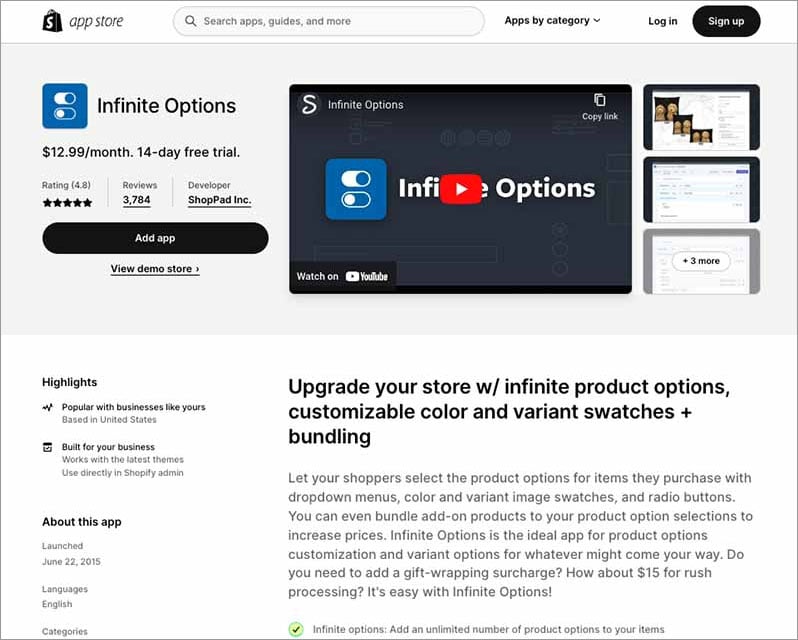
Ultimately, if you are selling something that doesn’t involve a large number of variants and product options you will be fine with Shopify — and if your needs are more extensive, apps do exist that get rid of the limits discussed above.
That said, I think it would be better if a more flexible approach to product options was currently available ‘out of the box’ (as is the case with rivals BigCommerce and Squarespace — both provide much more generous product option and variant limits).
Selling digital products
If you want to sell digital products with Shopify (for example eBooks or music), this is perfectly doable.
That said, when I tried to create them, I found myself getting a bit confused. This is because in order to sell downloadable files, Shopify users need to install a separate digital downloads app.
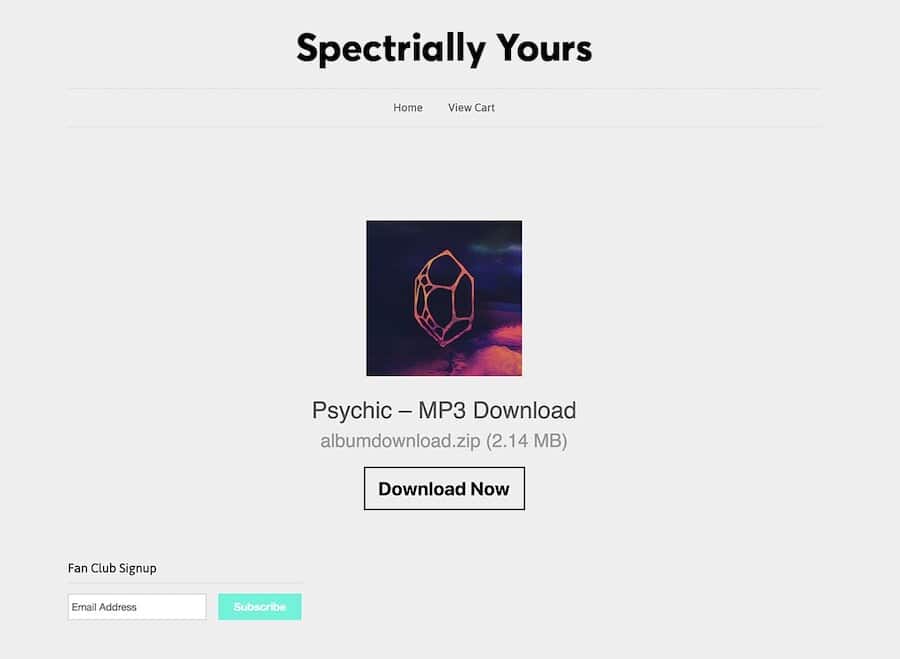
A large range of these is available, but Shopify’s own digital downloads app (pictured below) is a pretty good choice for most, because it’s free, easy to use and caters for relatively large file sizes. Our video below walks you through the process of selling with it.
You can also use the Digital Downloads App to bundle digital products with physical ones — for example, to offer an MP3 version of an album to everybody who bought a vinyl copy of it.
There is a limit on the file size of products you can sell, but it’s a generous one — 5GB. This limit compares very favourably to the limits imposed by other platforms — Wix, for example, caps downloadable product size at 1GB, BigCommerce at 512MB and Squarespace at 300MB.
If 5GB is not enough for your needs though, you can purchase a different Shopify app to host larger files, or use file sharing services like Dropbox to deliver them.
Custom fields and file uploads
Some store owners require their customers to provide some text at the point of purchase. For example, jewellers might need copy for an engraving, musicians might like to give customers the option to have a dedication added to a signed LP, etc.
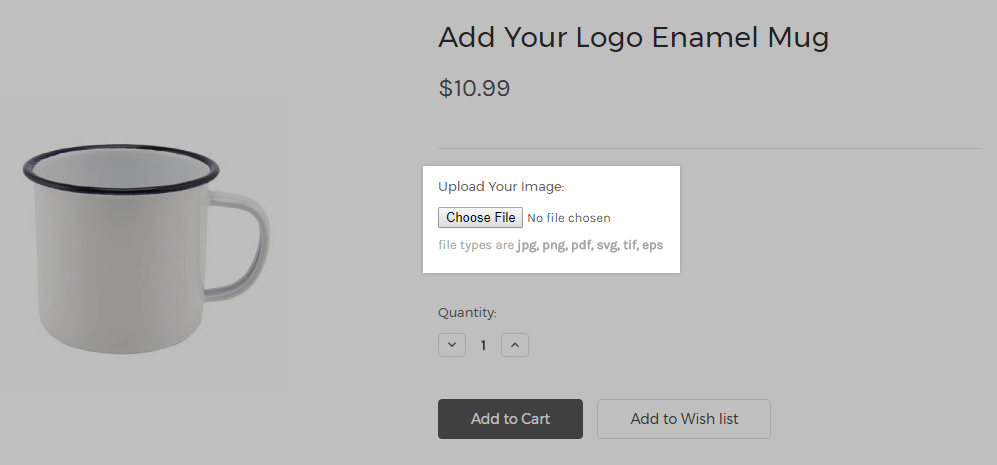
Shopify does allow you to capture this sort of data, but it’s a fiddly process — you’ll need to create a ‘line item property’ by manually adding some HTML code to your template. I’ve used this method in the past to add text boxes to checkouts, and the amount of coding required is fairly small — but that said, if you’re an ecommerce novice, you’ll be better off with a dedicated app.
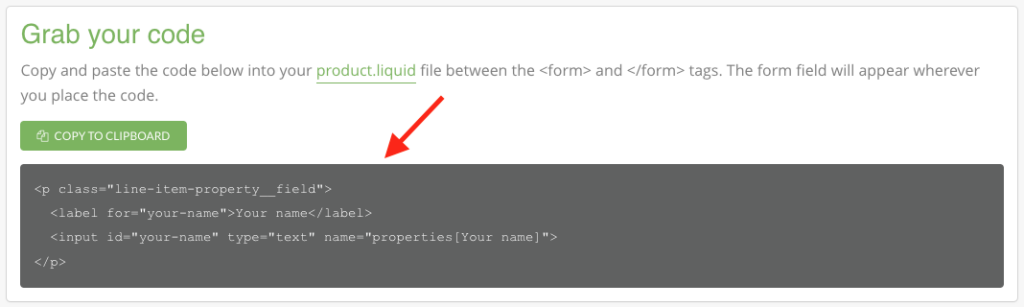
The other alternative is to pay for an app to do this job, which isn’t ideal.
It’s a similar story with file uploads — if you need to offer your customers the option to send files with their orders (for example, an image to be used on a t-shirt), you’re going to have to get coding or, yes, you guessed it, pay for a relevant app!
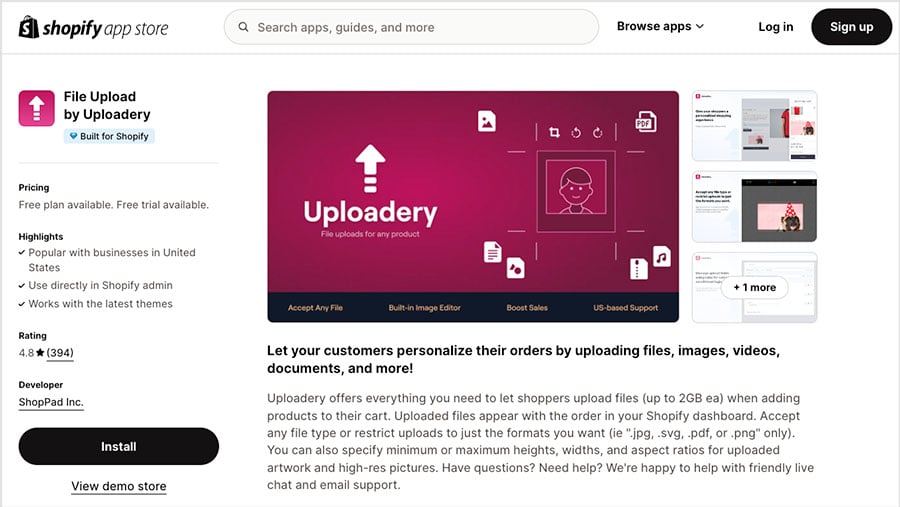
Ultimately, I would much prefer if text fields and file upload buttons were simply options that could just be selected and enabled when creating products. My experience of the current process for capturing custom data is that it is clunkier and/or more expensive than it needs to be.
Now, we’ve looked at various aspects of setting up products on Shopify. But how do you actually ship them?
Shipping products
Shopify is very flexible when it comes to shipping, allowing you to set:
- Free shipping rates
- Flat rates
- Price-based rates
- Weight-based rates
- Local delivery / pickup rates
- Calculated (‘real time’) shipping rates
When building Shopify stores, I’ve found it easy enough to set up shipping rules based on price or weight; similarly, creating shipping zones that cover groups of countries is pretty straightforward too.
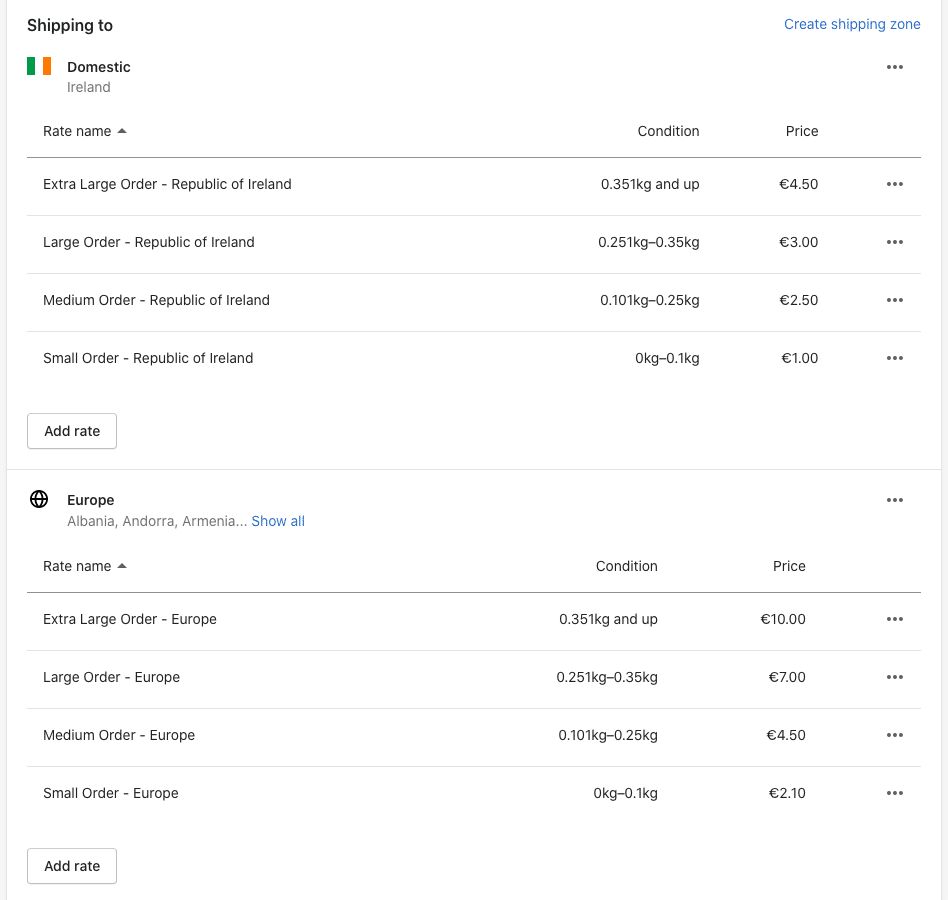
When it comes to real-time shipping rates — where carriers provide live estimates at checkout, based on distance, weight and the number of boxes needed to ship items — you have two options, depending on your location.
In certain countries — the ones highlighted in the table below — you can use the ‘Shopify Shipping’ service. This lets you provide real-time shipping quotations from local postal services, print shipping labels and provide preferential rates on shipping.
| Fulfillment location | Available shipping carriers for Shopify |
|---|---|
| United States | FedEx by Shippo, USPS, UPS (not available in Puerto Rico), DHL Express (continental US only) |
| Canada | Canada Post, UPS |
| Australia | Sendle |
| United Kingdom | Evri, DPD |
| France | Colissimo, Mondial Relay, Chronopost |
| Italy | Poste Italiane |
| Spain | Correos |
If you’re based in a country where Shopify Shipping is available, you’ll find the feature included on all plans, and the discounts provided can be quite significant on the higher-level Shopify plans (in the US, you can avail of up to 88.5% postage discounts on higher-tier plans).
The other real-time shipping option is to use third-party calculated shipping rates. I’m not so keen on this option, because it can end up being very expensive. Third-party calculated shipping is only available if you:
- pay on a monthly basis for an ‘Advanced Shopify’ or ‘Shopify Plus’ plan
- subscribe to the ‘Shopify’ plan on an annual basis
- subscribe to the ‘Shopify’ plan and pay an additional monthly fee.
This contrasts negatively with the approach taken by some competitors, especially BigCommerce, which makes this feature available on all its plans, even its $39 entry-level one.
Now, let’s look at another type of shipping…
Dropshipping with Shopify
Many potential users of Shopify will be wondering how it facilitates dropshipping.
With dropshipping, you take an order, send it to a supplier, and they deliver the goods to your client — in other words, you don’t make, store or fulfil any products, and your ecommerce site becomes a ‘middle man’ of sorts.
There are various pros and cons associated with this approach to ecommerce — my personal experience suggests that it’s usually not the golden goose it’s claimed to be — but it does unquestionably give you a very low-risk way to start a business.
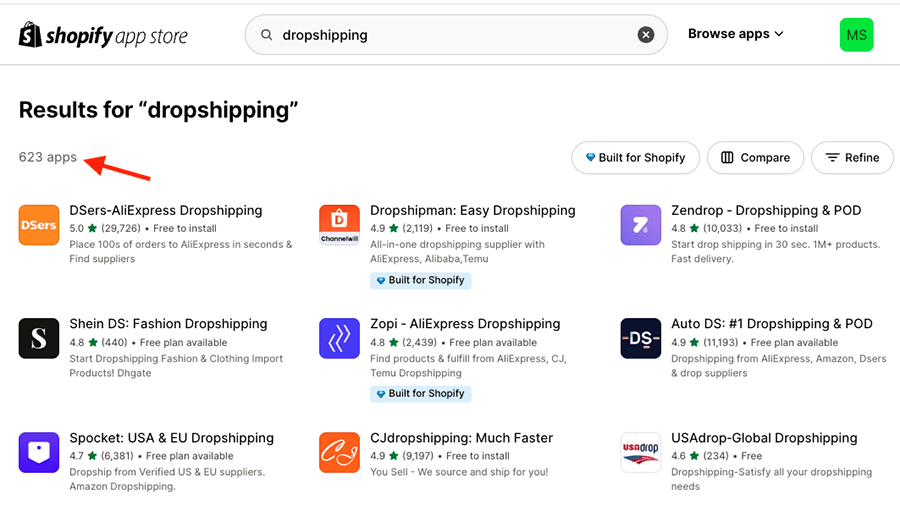
The good news is that Shopify offers an extremely large range of dropshipping apps that allow you to source and sell a variety of suppliers’ products online. I found 623 such apps available at time of writing, with popular services like Spocket, Ali Express and Modalyst all catered for.
Shopify is also a strong choice for print on demand (POD) applications, with key POD apps like Printful and Printify integrating particularly neatly with the platform.
(I counted 561 POD apps in the Shopify app store when conducting research for this review.)
📚 Related resources:
- Shopify trial guide
- Printful review
- Printify review
One thing I couldn’t find at all in the Shopify app store however is more information on the quality of dropshipping suppliers — an ‘ethical rating’ or similar.
This is a big omission, because a lot of dropshipped goods are produced in countries where working conditions can be very poor. As things stand, it’s hard to be 100% confident that the goods you sell via many of Shopify’s dropshipping apps are ethically produced.
So, if you are concerned about the ethical dimension, you’ll need to do some due diligence research before committing to a particular app or supplier. But in terms of the range of dropshipping options available to you as a merchant, the market leader is definitely Shopify.
👉 Learn more about dropshipping with Shopify here.
Shopify Point of Sale (POS)
A particularly strong feature offered by Shopify, and one that helps it stand apart from its competitors, its comprehensive Point of Sale (POS) features.
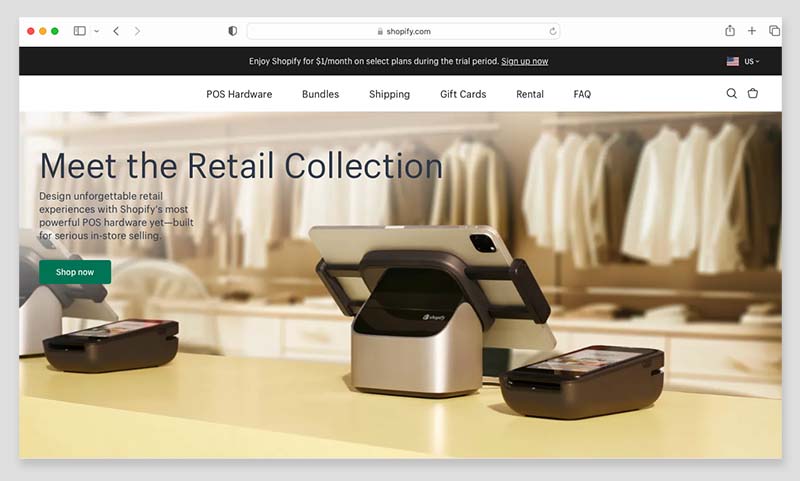
Shopify’s POS system is bundled with all its plans, and lets you use the platform to sell not just online but in physical locations too. A wide range of hardware is available — card readers, barcode scanners, tills, receipt printers etc. — to help you do this.
As for where you can buy Shopify POS devices, there is a dedicated Shopify ‘hardware store’ that sells them. It can be used to purchase POS equipment in many territories, including the US, several EU countries, Australia, New Zealand, Singapore and the UK. If you’re based outside a supported country, you can still buy Shopify POS hardware, but will need to do so from an authorized reseller.
Now, there are several applications for these point-of-sale tools. For example, they allow you to sell:
- in a ‘brick and mortar’ retail outlet
- in a pop-up shop
- from a market stall
- at an event.
And all while keeping your offline and online sales data in sync, and your inventory figures accurate.
It’s important to note however that if you’re serious about selling in person, you’ll usually need the ‘Shopify POS Pro’ add-on to get the most out of the point of sale features.
This is because although all Shopify plans let you use POS functionality, with the exception of ‘Shopify Plus’ they limit the number of staff who can access it, and don’t give you access to the best POS features. You will definitely need the ‘POS Pro’ add-on if you want to do things like:
- work with an unlimited number of store staff
- define staff roles and permissions
- facilitate exchanges
- provide custom printed receipts
- create purchase orders
- attribute sales to particular staff members (for commission assignment or performance-analysis purposes).
- get low stock warnings
You can learn more about Shopify POS features here.
Unfortunately, the cost for the Shopify ‘POS Pro’ add-on is relatively high: $89 per month, per location ($79 per month if you pay upfront for a year). This means that if you run a few physical stores, your monthly POS outgoings will increase significantly.
In terms of the number of locations you can sell from (or store inventory at), the ‘Starter’ plan lets you sell at 2; ‘Basic,’ ‘Shopify’ and ‘Advanced’ let you sell at 10; and ‘Shopify Plus’ lets you sell at 200.
(Note: if you’re a Shopify Plus subscriber, you get 20 POS Pro locations included with your plan).
Shopify POS: a real-life merchant’s take
To find out how good the Shopify POS features were, I interviewed my friend Liz Jones, who runs a Shopify POS system, and spent a morning with her as she used the system to accept payments. I made a video recording of this — which you can watch below — but the main conclusion I drew from my time with Liz was that Shopify POS is good when it comes to user-friendliness and value for money, but that customer service could be a bit better.
The biggest complaint that Liz had was that software updates to Shopify’s POS system sometimes knocked it out during trading — which is obviously far from ideal, given how many people pay card-only these days.

Tax calculation in Shopify
Automatic tax calculation
One of the challenges of selling online is that you can end up making sales in a variety of jurisdictions with different tax rates — something you have to reflect in the pricing of your products. Thankfully, Shopify allows you to apply tax rates automatically for most territories, which is a big time saver.
Additionally, registration-based taxes (which cater for VAT / state-based taxes etc.) are available for:
- Australia
- Canada
- European Union
- New Zealand
- Norway
- Singapore
- Switzerland
- United Kingdom
- United States
Not all competing products facilitate automatic tax calculation, and those that do tend to limit the feature to a smaller number of countries — so a thumbs up to Shopify for this.
There is a bit of a downside to tax calculation in Shopify, however: if you exceed $100,000 in sales, a transaction fee of 0.25% to 0.35% (depending on plan) will be applied to any sale involving a tax calculation. This won’t be much of an issue for many merchants (especially new ones), but those operating stores with a high turnover might find it annoying.
VAT MOSS
A particularly strong aspect of the Shopify platform is the way that it caters really well for the EU’s VAT MOSS system (or, to use the full title, ‘VAT Mini One Stop Shop.’).
VAT MOSS is a requirement that sellers of digital products to consumers in the EU add value added tax (VAT) to each product on a per-country basis — i.e., there’s one VAT rate to be applied for France, one for Ireland, another for Germany and so on.
But unlike a lot of competing products, Shopify calculates and applies the appropriate digital tax rate automatically. So there’s no messing about with setting up manual tax rules to worry about.
This is an extremely useful piece of functionality and for me, it’s a USP. I’ve used Shopify to sell ebooks on the Style Factory site to customers based in lots of different EU countries, and the VAT MOSS features have saved me hours in admin.
And speaking of selling in other countries…
International selling
Accepting multiple currencies in Shopify
Displaying prices and facilitating checkout in local currencies can improve sales rates considerably.
And, unlike several other well-known ecommerce solutions — notably Squarespace and Wix — Shopify lets you do this really easily, thanks to its ‘Shopify Markets’ feature (available on the ‘Basic’ plan or higher).
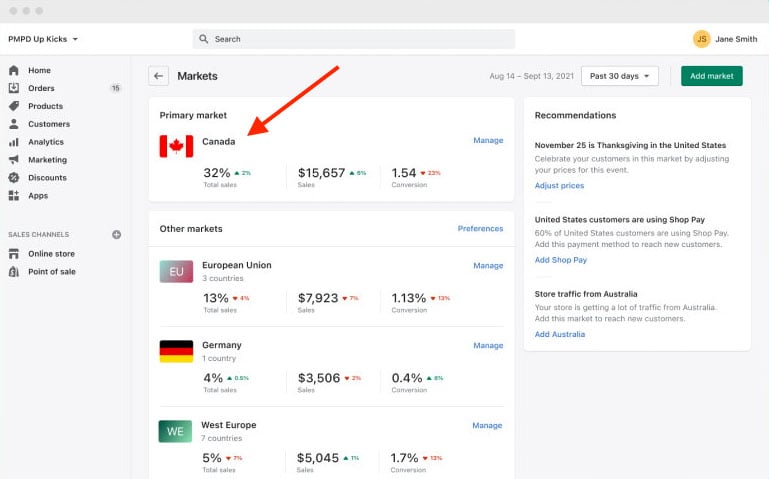
This lets you define selling areas — ‘markets’ based on country or groups of countries. You can then manage currencies, languages, local domains and payment processors for these markets all in one place.
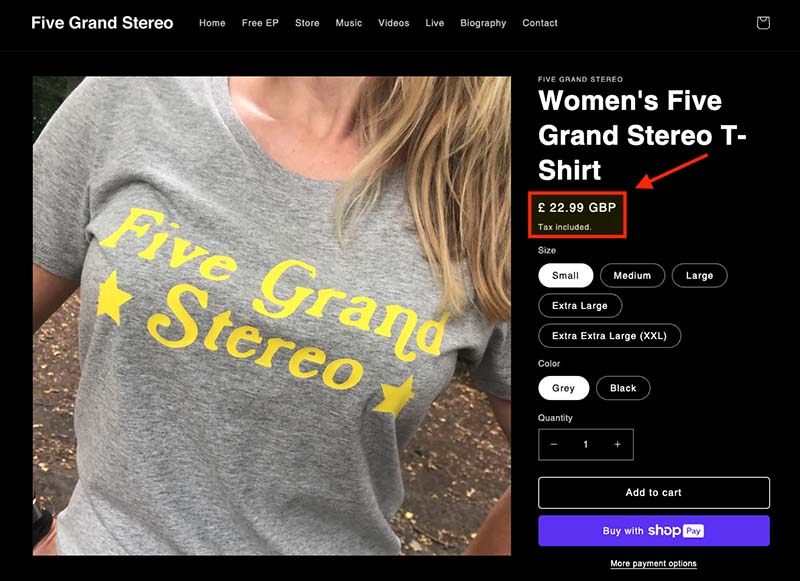
Shopify simply looks at where your visitors are located (based on IP address) and automatically presents your product prices in their local currency. Checkout happens in that currency too, which can further improve conversion rates.
Having used Shopify’s international selling features extensively to sell my band’s albums online, I’ve discovered a couple of issues to watch out for, however.
First, it turns out that you can only apply duties and import taxes if you’re on the ‘Advanced’ or ‘Shopify Plus’ plan (both of which are very expensive).
Second, Shopify recently introduced a three market limit on the ‘Basic,’ ‘Shopify’ and ‘Advanced’ plans. This is significant because although a market can involve multiple currencies, all local prices displayed are conversions of prices set in that market’s ‘primary’ currency — i.e., you won’t be able to facilitate custom, per-country pricing within the same market (you’ll need to set up a separate one to do that).
If you want to create more than three markets, you’ll have to either:
- pay $399 per month for an ‘Advanced’ Shopify subscription plus an additional fee of $59 per market created
- upgrade to the enterprise-grade ‘Shopify Plus’ plan, which gives you 50 markets to play with by default (but will involve paying at least $2,300 per month).
Finally, currency conversion only works if you’re using Shopify Payments. If you are based in a country that doesn’t yet support Shopify Payments, you’ll need to install a third-party app to gain multi-currency features.
Overall, I think that the way that Shopify handles multi-currency selling is really good — but it’s a shame about the ‘3 market’ limit, which makes the feature less useful than it previously was.
Now, let’s look at another aspect of international selling: translating your store.
Building a multilingual website with Shopify
In addition to facilitating transactions in multiple currencies, Shopify lets you sell in multiple languages. With the exception of its ‘Starter’ plan, all Shopify plans let you create up to 20 translated versions of your store.
When you enable multilingual selling, a language ‘folder’ is added to your domain. So you’ll end up with myshop.com/fr, myshop.com/de etc.
Alternatively, you can use ‘international domains’ — myshop.fr, myshop.de etc. — to host foreign-language versions of your store.
This is all pretty good stuff — the only complaint I might have is that some competing platforms I’ve tried let you sell in a lot more languages (Wix, for example, lets you sell in 180 or so, and WordPress doesn’t really have any limits to worry about at all, so long as you’re using the correct plugin for it).
Tip: While you’re here, check out our free ecommerce kit. It’s packed with useful resources on setting up an online business, along with trials and offers for popular ecommerce platforms.
👉 Access the ecommerce kit here.
Abandoned cart recovery
Abandoned cart recovery lets you identify store visitors who go part of the way through a purchase only to change their mind about it, and email them an incentive to complete their purchase (usually in the form of a discount code).
The good news is that abandoned cart recovery is included on nearly all the Shopify plans, meaning that you get this key piece of functionality at a lower price point than its key competitors.
For example, while Shopify gives you an abandoned cart saving feature from just $39 (i.e., on its ‘Basic’ plan or higher), BigCommerce and Squarespace only offer it on their $105 and $72 per month plans respectively.
In terms of how abandoned cart recovery in Shopify works, you can choose to send messages based on whether a user has:
- abandoned their cart during the checkout process
- left the site with items in their cart, and without starting checkout
- browsed products on the site, but not added them to a cart.
The thing I really like about Shopify’s abandoned cart recovery is the option you get to configure the process exactly the way you want, via editable workflows.
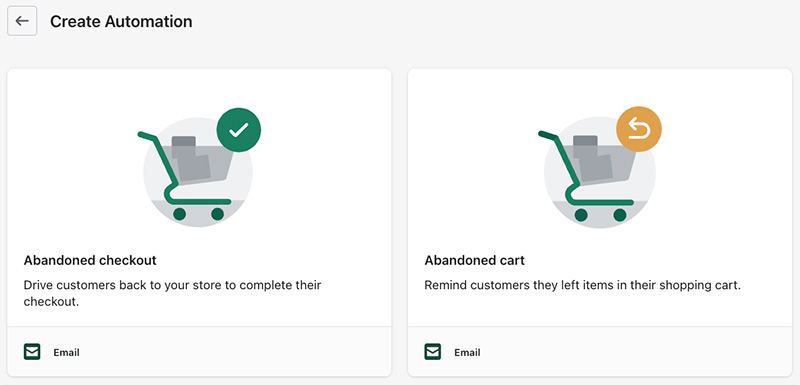
As my screenshot below shows, when testing the feature, I could add sophisticated conditions or actions to each and every step of proceedings. This means that if you require a very bespoke approach to cart recovery, you can have one.
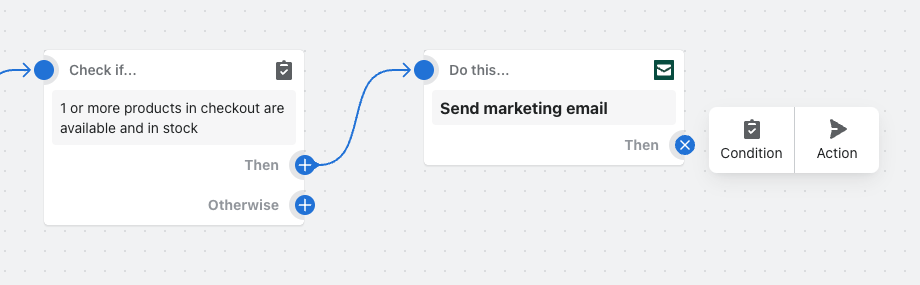
All in all, Shopify’s abandoned cart recovery tools work superbly, letting you create custom workflows that are not available from most key competing solutions.
Marketing and SEO
Search engine optimization (SEO) in Shopify
Is Shopify good when it comes to SEO?
The short answer is yes — its SEO features are strong and compare favourably with other hosted site-building platforms.
Nuts and bolts
When doing some test optimization work on a Shopify store, I certainly found the nuts and bolts of on-page SEO very easy to manage using the platform — changing page titles and meta descriptions was very easy, as was adding headings and alt text. I was pleased to find out that you can tweak your robots.txt file extensively in Shopify too — this is not the case with some competing tools, notably Squarespace.
(Note: if you’re new to these terms, you’ll find explanations of them all in our SEO glossary.)
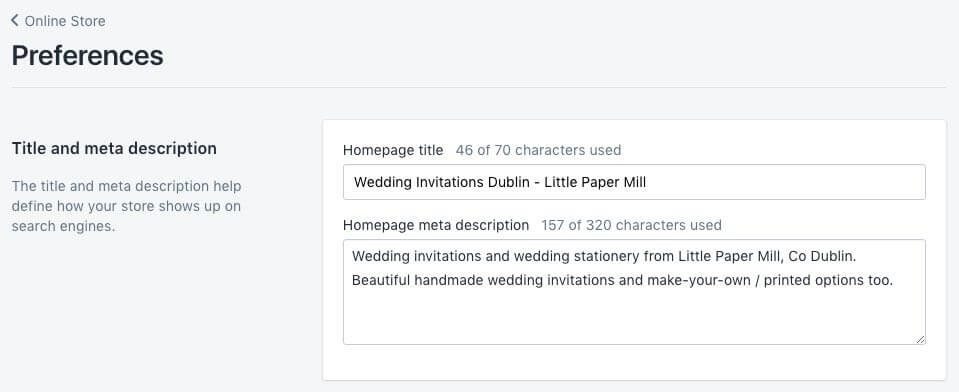
The only ‘nuts and bolts’ area where I feel that Shopify could improve its SEO setup significantly involves image file names — if you want to change the file name of a product image for SEO purposes, you’ll have to rename it locally and then re-upload it. This can pose problems for users with a lot of images on their site in need of optimization.
Yoast integration
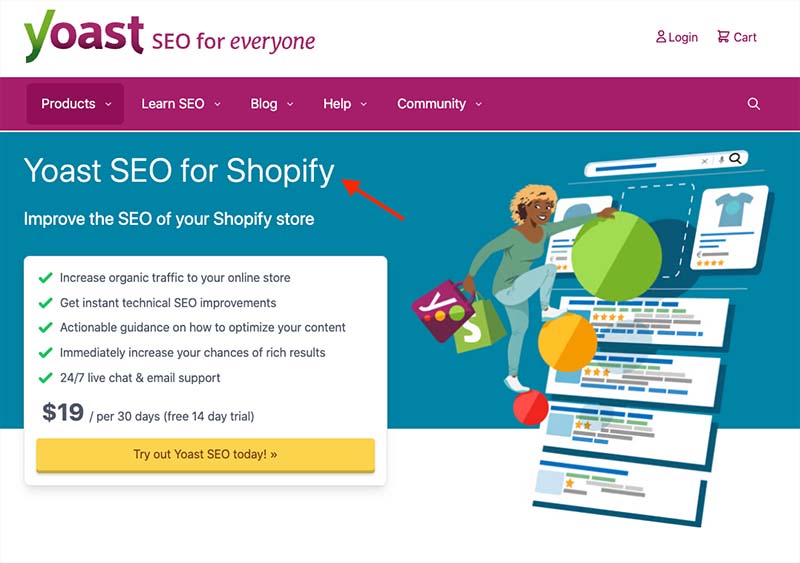
I was delighted to discover that an integration with the popular Yoast SEO tool is available for Shopify. This lets you perform an in-depth evaluation of the quality of your on-page SEO; we love using it in WordPress and it’s great that Shopify users can benefit from it too — the only negative here being that unlike the WordPress version, Yoast for Shopify always involves a fee. Even so, the availability of Yoast is a significant USP for Shopify, because no other hosted website builder supports it.
301 redirects
I found adding 301 redirects — which let search engines know when a page location has changed — particularly easy to do in Shopify. In fact, the platform automatically prompted me to do this, and created the redirect too, every time I changed a page’s URL (see screenshot below).
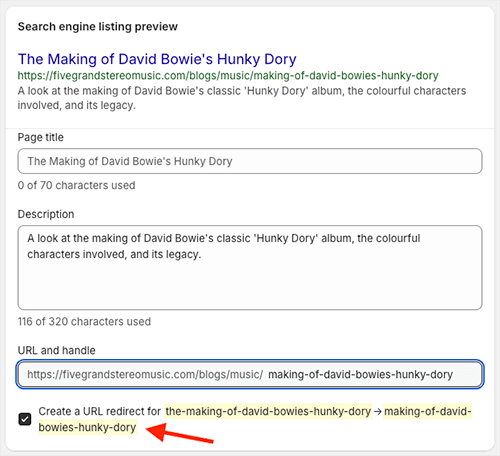
As forgetting to set up 301 redirects is a common source of lost rankings, this automated reminder is an extremely useful feature.
Site performance / Core Web Vitals
Unlike WordPress and other self-hosted solutions, you don’t get fine grain control over your hosting in Shopify — you have to use the default Shopify hosting setup. This mean that you can’t tweak technical SEO and site speed to the nth degree. But the hosting provided by Shopify is reasonably fast — in my tests I found that so long I didn’t add too many large images or videos to proceedings, I got pretty good results when running Shopify stores through Google’s PageSpeed Insights tool.
Importantly, Shopify uses a CDN (content delivery network) to decrease your page loading times — both of these approaches to web design can lead to preferential placement in search results.
And unlike some competing ecommerce solutions, Shopify gives you an increasing amount of data regarding how your site is measuring up to Google’s ‘Core Web Vitals‘ requirements. These are a set of targets relating to the speed, responsiveness and visual stability of a website — and sites that meet them can receive preferential treatment in Google search results.
A new performance dashboard that aims to help store owners understand and meet Core Web Vitals requirements has recently been introduced, and this is really good for giving you an immediate sense of where you need to make improvements.
Here’s a ‘Web Performance’ report that I pulled in Shopify for a music store I run with the platform:
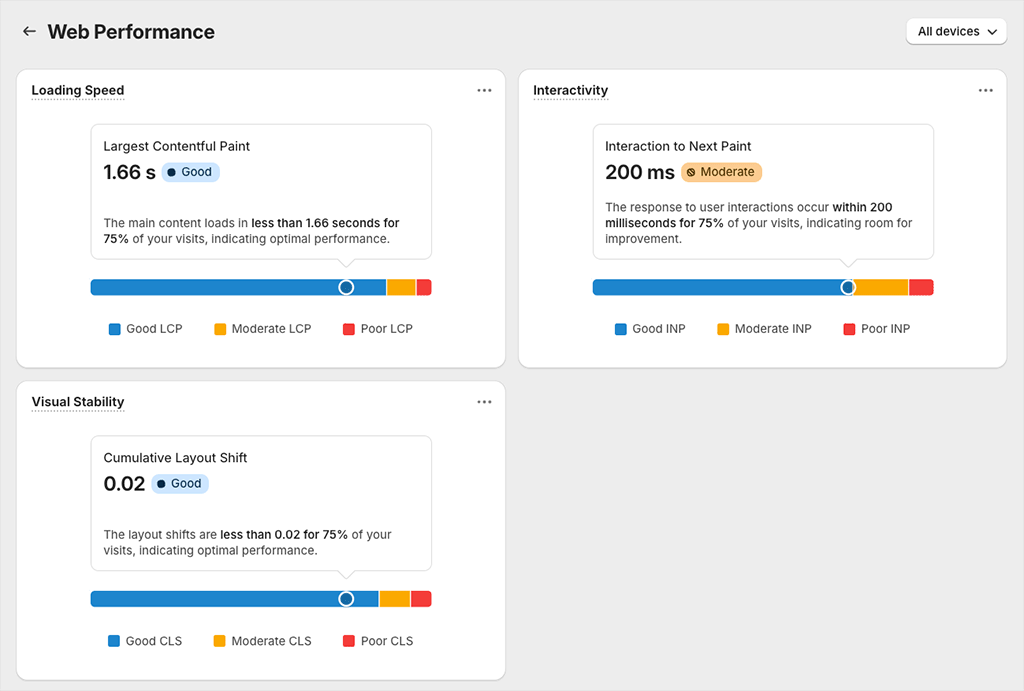
As you can see, this report gives me a pretty clear picture of how my store is measuring up against the key Google metrics. What it doesn’t do however — and I think this is a bit disappointing really — is provide concrete recommendations on how the necessary improvements can be made. So, for example, the report above indicates that I need to make improvements to my store’s ‘Interaction to Next Paint’ store — but doesn’t give me any information at all on how to do that.
Overall though, my experience with the Shopify SEO features was a positive one: they are very well thought through and give you control over pretty much every aspect of SEO except hosting.
📚 Related resource: Shopify SEO guide
For more detailed information about how to optimize a Shopify store for search engines, check out our guide to Shopify SEO.
Email marketing in Shopify: ‘Shopify Email’
A key part of running an online store is ensure that you’re doing email marketing right: sending well-crafted e-newsletters to your email list is key to generating sales. Recognizing this — and the fact that other leading ecommerce platforms like Squarespace and Wix offer built-in email marketing features — Shopify now provides a free app, ‘Shopify Email,’ that allows you to create e-newsletters.

Now, Shopify Email started out as a very basic email marketing tool that only allowed you to send very simple e-newsletters.
But over the past couple of years it’s evolved significantly, and now offers you the option to segment your mailing list more extensively and automate your mailouts using conditional logic.
(For example, you can configure Shopify Email so that it sends welcome emails, upsell emails etc., based on particular subscriber actions.)
And new AI features let you optimize the send times for your emails automatically, or generate email subject lines.
While the feature is not as sophisticated as dedicated email marketing tools like GetResponse or Mailchimp, the deep integration with Shopify’s ecommerce tools is great, and the feature will definitely prove useful to many merchants (particularly those who like to manage all aspects of their ecommerce business in one place).

But for me, the best thing about Shopify Email is probably its price: you can use the app to send up to 10,000 emails per month for free, with a $1 fee applying to every additional 1,000 emails sent after that.
(If you’re a high-volume user, sending over 750,000 emails per month, this fee drops to as little as $0.55 per additional 1,000 emails).
You can learn more about Shopify Email here.
Blogging in Shopify
Blogging is one of the key ways to increase organic traffic to your site — and usually a pretty vital activity for online merchants. Helpfully, Shopify comes with a built-in blogging tool that allows you to create the sort of content you’ll need to ensure your site is visible in Google search results.
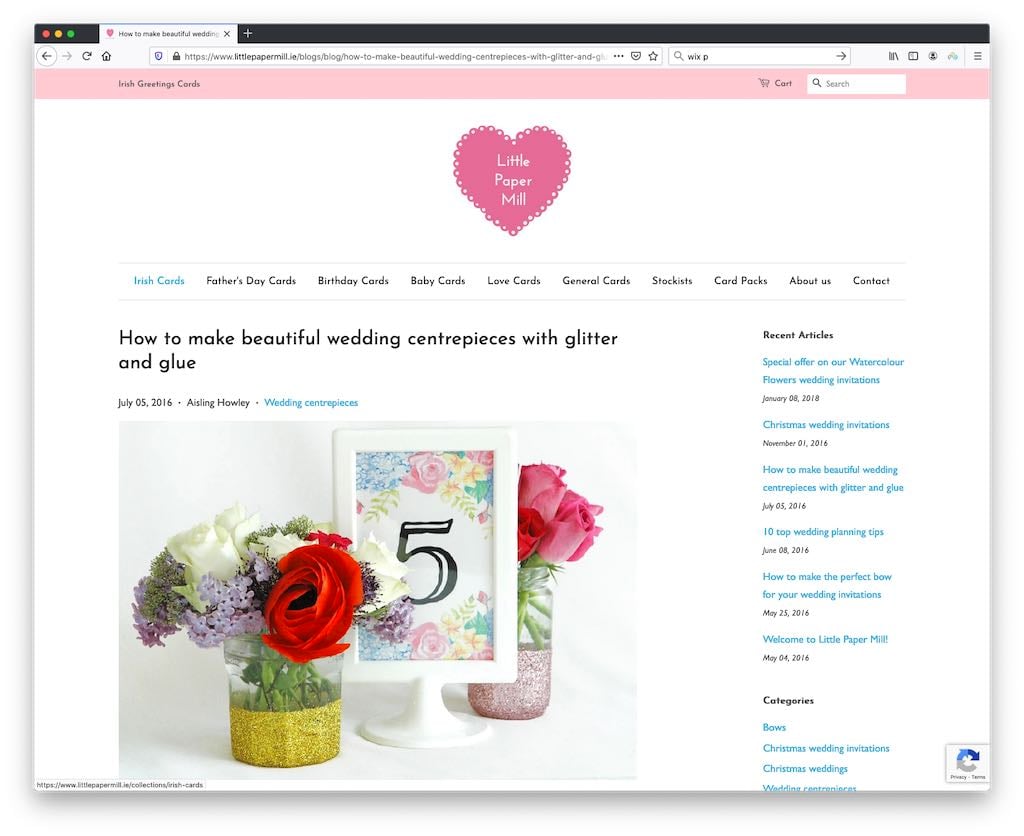
However, my overall experience with blogging in Shopify to date has been disappointing. Its blogging feature is not nearly as sophisticated or powerful as that which you’d find on some other platforms — especially WordPress. There are no version history tools and when it comes to categorization of blog posts, Shopify only allows you to use tags (i.e., you can’t apply categories).
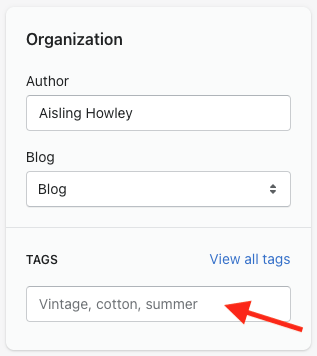
(Professional blogging platforms will typically permit use of both tags and categories).
It also has to be said that the blogging interface is quite old fashioned, and whenever I’m blogging on a Shopify-powered site, I always find myself frustrated with it. The Shopify blog editor doesn’t let you drag and drop content around your posts, add captions to images or insert forms into your posts — something that is incredibly easy to do in competing platforms like Squarespace or Wix.
(Weirdly, given Shopify’s ecommerce focus, I found that even inserting a product into a blog post is difficult.)
Workarounds are available to get around some of these issues — usually involving the addition of HTML to your blog post, or the purchase of an app — but overall, I feel the blogging functionality could really do with a bit of a refresh. It’s very 2000s in vibe!
The Shopify app store
In addition to Shopify’s core functionality, there is also an app store that store owners can visit to obtain applications — both free and paid-for — that let you add additional features to a Shopify website.
This contains a huge number of apps (over 13,000), making Shopify’s app store bigger than those of all the other ecommerce platforms I’ve reviewed. These apps either add specific functionality to your store, or let it work with key pieces of business software.
Examples of the sort of Shopify apps you can install on your store include:
- data capture apps
- accounting apps
- abandoned cart saver apps
- advanced reporting apps
- checkout apps.
Key business admin apps that are supported via integrations include Xero, Hubspot and Zendesk; the app store also provides integrations that let you connect Shopify to leading email marketing solutions like Mailchimp, GetResponse, AWeber and Campaign Monitor.
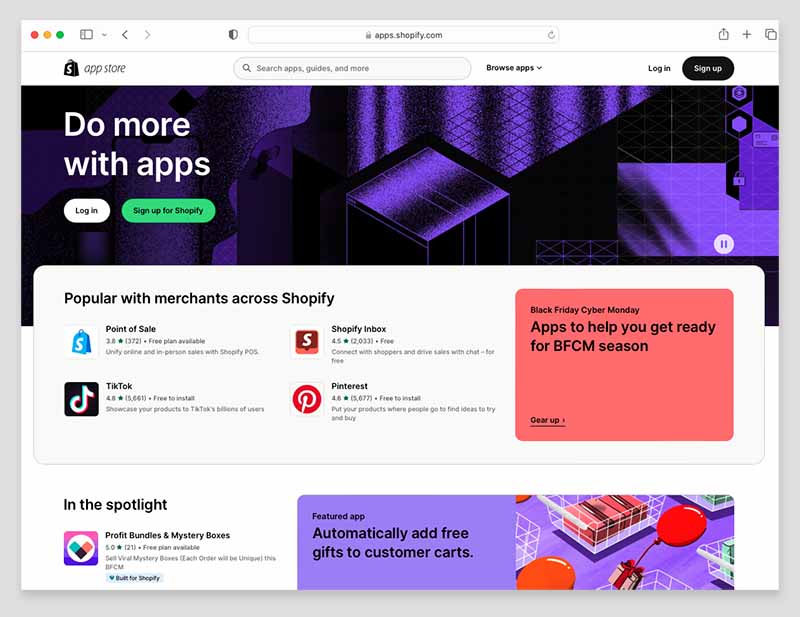
Now, this huge range of apps is one of the strongest arguments for using Shopify over its rivals — but I think that it’s also an argument against doing so.
On the plus side, it means that you have a fantastic range of options for adding functionality to your store and integrating it with other tools.
On the downside, it makes it tempting for Shopify to force you in the direction of a paid-for app to gain key functionality. Product reviews, backups, GDPR compliance, gaining additional product options and adding custom fields at checkout all usually involve installing a paid-for app.
(And the more apps you add, the slower your store can perform — something that can have negative implications for SEO.)
Competing platforms like Wix and BigCommerce, by contrast, tend to include more functionality like this out of the box — meaning that you don’t end up spending quite as much money on apps.
Reporting
Shopify provides a comprehensive range of reports, including:
- sales reports
- customer reports
- marketing reports
- search data reports
- finance reports
- abandoned cart reports.
When using the reports to examine the performance of Shopify stores I manage, I’ve found the data comprehensive, clearly laid out and extremely easy to understand.
There is one annoying thing about reporting in Shopify however: you can’t create custom reports unless you’re on an ‘Advanced’ or ‘Shopify Plus’ plan. And given their high prices, these plans are really only suitable for merchants making very large volumes of sales.
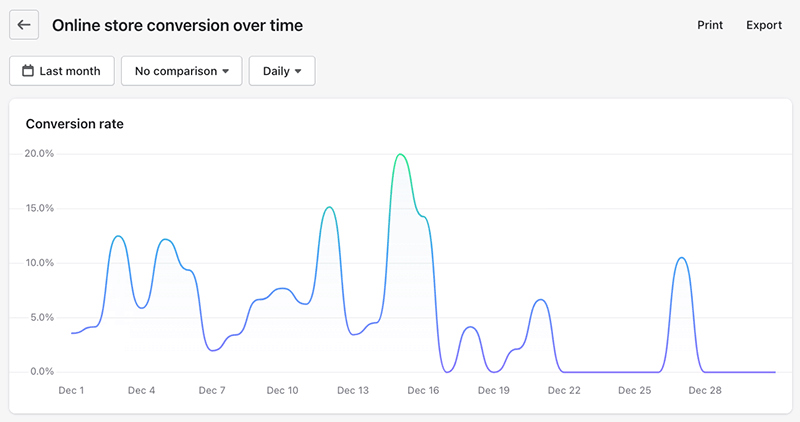
But all that said, the reporting functionality you do get on the entry level Shopify plans is very solid. And if you need more data but don’t want to pay for a more expensive Shopify plan, you can always consider adding Google Analytics to your Shopify account.
Managing your Shopify store on a mobile device
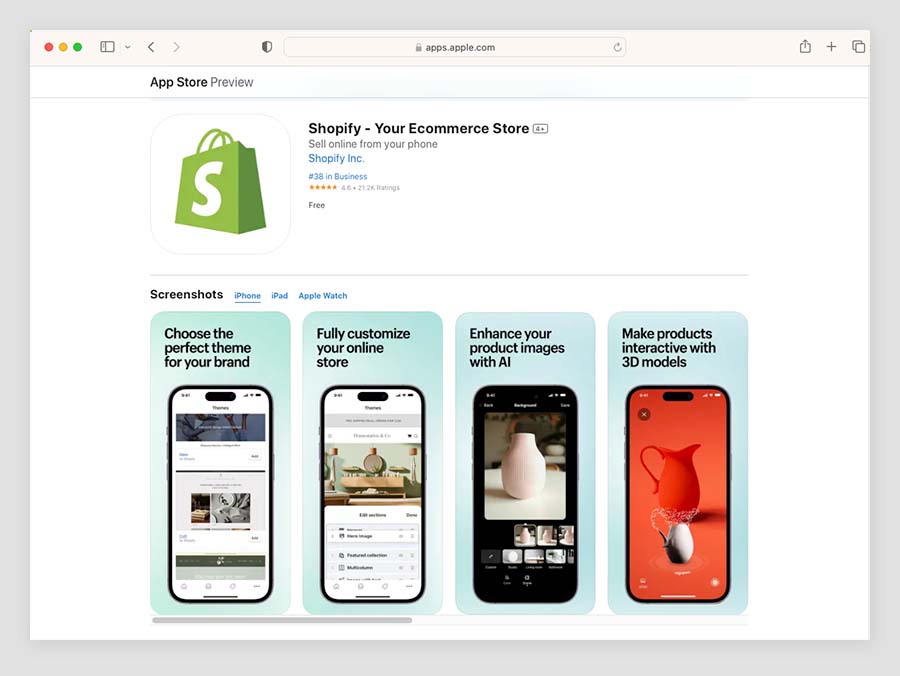
Shopify provides two main apps which you can use to manage your store on a mobile device: ‘Shopify‘ and ‘Shopify Point of Sale.’ These are available for both iOS and Android.
The main ‘Shopify’ app scores 4.6 and 4.3 out of 5 on the Apple and Google Play app stores respectively. The ‘Shopify POS’ app fares less well in terms of Google Play reviews however, being rated 3.5 out of 5 by Android users; iOS users are more enthusiastic about it, giving it a score of 4.5 out of 5.
The ‘Shopify’ app lets you:
- customize your store theme
- view and fulfil orders
- add/edit products
- view reports
- communicate with your team members via an order ‘timeline’
- use Shopify Email features.
The ‘Point of Sale’ app, as its name suggests, lets you use Shopify’s POS system — you can use it to take card payments in person, track inventory, text receipts to customers and so on.
In addition to the store management apps, there’s a useful app called ‘Shopify Inbox‘ available, which lets you add a live chat service to your Shopify store.
It also makes it easier to answer queries, capture leads or share your product details with customers when chatting with them over Facebook Messenger or Instagram.

(The Shopify Inbox app is rated particularly highly by its users, garnering iOS and Google Play store scores of 4.8 and 4.5 out of 5 respectively.)
Depending on whether you’re using iOS or Android, there are some other apps available too, including a logo-making app and a stock photography app.
Of all the above apps, the main ‘Shopify’ app is likely to be the most use to the vast majority of merchants, however.
The ‘Shop’ app from Shopify
In addition to providing apps that let merchants manage their business, Shopify also provides a more ‘customer centric’ app, ‘Shop.’
This provides its users with an accelerated checkout experience on any Shopify store, a way to pay for products in interest-free instalments, a buy-now pay later option, a merchant-tipping facility and personalized shopping recommendations.

To enable your customers to use the app to purchase goods from your store, you need to add the ‘Shop’ sales channel to your Shopify store.
Security and backing up data
One of the main advantages of using a hosted solution like Shopify over a self-hosted one (like WordPress or Drupal) is that keeping your site secure is largely the software company’s job.
With a Shopify store, there’s never any core software or plugin updates to worry about; Shopify runs these updates for you in the background. Having used both WordPress and Shopify extensively in the past, I can safely say that not having to worry about this sort of site maintenance is one of the key things I really appreciate about the latter!
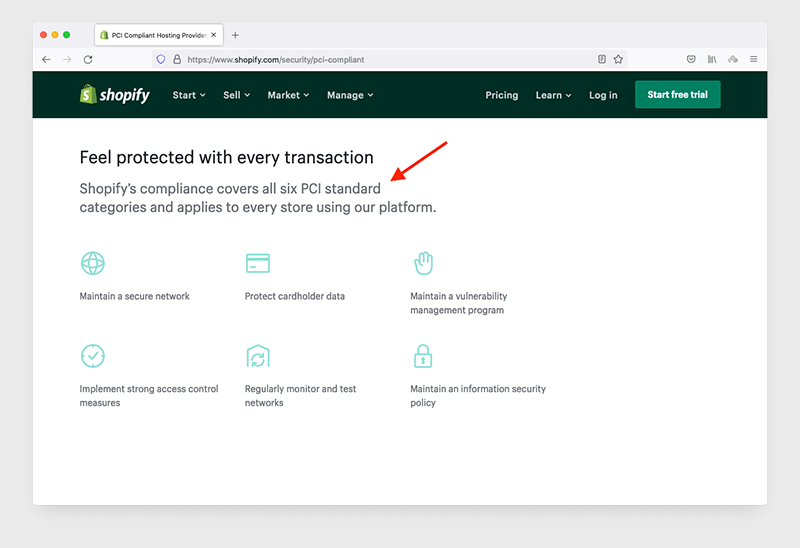
Similarly, ensuring that credit card transactions are safe for your customers is something that Shopify takes responsibility for (via PCI compliance).
You will need to give some more thought to data backups however; although in an emergency you may be able to retrieve data via a Shopify helpdesk enquiry, it’s safer to either export your product data regularly to a CSV file, or invest in a dedicated content backup tool from the Shopify app store.
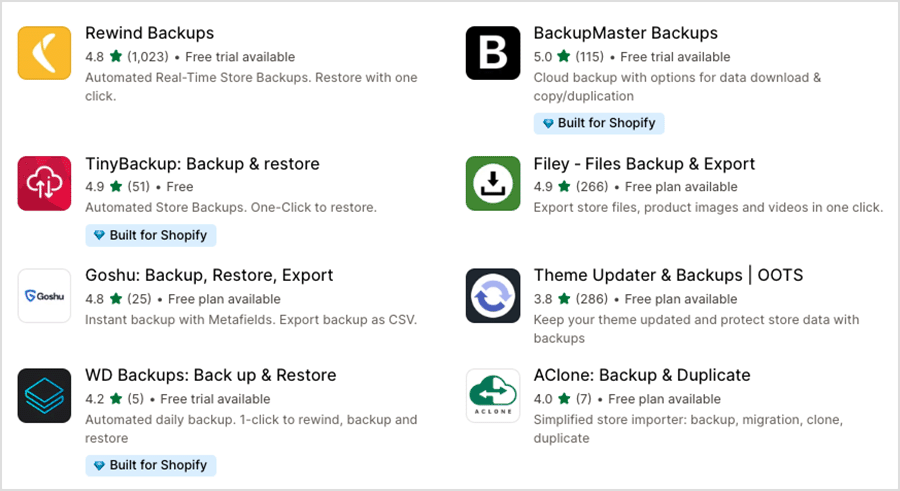
As the latter option will increase monthly outgoings a bit, this is not ideal.
Shopify customer support
Until recently, Shopify’s customer support was arguably the most comprehensive available from a store builder company, with 24/7 support available via phone, chat and email.
However, the company now only provides live chat and email support on most plans. Phone support is reserved for Shopify Plus users; and email support involves logging into your account and using a ‘leave a message’ form (with a 24-hour response time applying).
The lack of phone support on cheaper plans contrasts negatively with key competing tools like Wix and BigCommerce, which still offer it on their standard subscriptions.
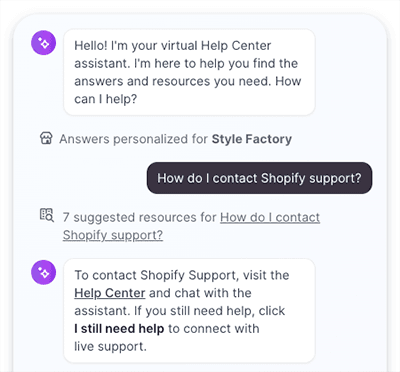
And there are a couple of issues with the live chat service to be aware of. First, before you can get through to a human, you have to address your query to Shopify’s AI assistant. Based on my experience of it, this chatbot is actually not as bad as you might think — but it’s a hoop that not every user will be happy to jump through.
Second, Shopify’s live chat support only caters for a relatively small number of languages. It’s unclear on the Shopify site precisely which ones are supported, so I reached out to the Shopify customer service team for more information on this point. I was then told that it’s available in Brazillian Portuguese, Danish, Dutch, English, French, Spanish, Italian, German and Swedish, with conversations available in other languages via use of Google Translate.
(As my colleague Matt Walsh observed when discussing these developments with me, the robot takeover continues…)
Ultimately, it has to be said that all this amounts to a bit of a step backwards for Shopify in the customer service department. I did quick trawl through Reddit and other user forums to gain some reaction to this development: the posts I read suggested that users are quite unhappy with the removal of phone support. There were also many reports of slow response times from the live chat team.
(For the record, when I reached out to the Shopify support team during my research for this review, I had to wait five minutes for help — which wasn’t awful. There were relatively long delays between the exchanges between myself and the advisor, however.)
As for online support materials, these are available in 18 languages, and on the whole, they are very clear. The only thing I feel is missing from them really is screenshots and videos — nearly everything is text-based.
OK, so I’ve walked you through all the key Shopify features. Now, let’s take a look at how much they cost…
Shopify pricing and value for money
There are five main Shopify pricing plans available:
- Starter — $5 per month
- Basic — $39 per month
- Shopify — $105 per month
- Advanced — $399 per month
- Shopify Plus — custom pricing, but starting at $2,300 per month.
There are a couple of things it’s worth mentioning quickly here:
- If you pay annually for your plan, you can avail of a significant discount — paying for your first year’s service upfront gets you 25% off your plan.
- Additional fees apply to make the most out of Shopify’s point-of-sale (POS) features, which let you sell goods in a physical location.
There is also a free trial available, which lasts for three days. When this is over, you are given the option to get three months’ access to the platform for $1 per month. After that, regular fees apply.
Shopify 3-month trial >
Key differences between Shopify plans
All the Shopify plans provide the core ecommerce functionality you’d expect — on every plan, you can create catalogs of unlimited products, accept credit card payments, sell gift cards, offer discount codes on purchases and make use of a wide range of third-party apps.
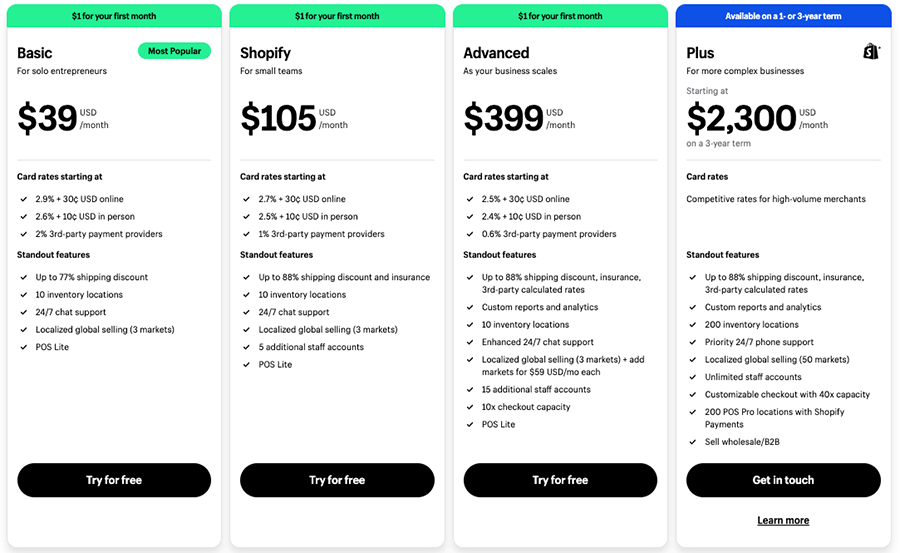
But there are a few key features to watch out for — and not miss! — by selecting the wrong Shopify plan. These are:
- A fully-featured, standalone online store — the ‘Starter’ plan doesn’t let you create one. Instead, you can use this plan to sell on social media and messaging apps, or embed your products on other websites via a ‘buy button’. (A very basic storefront, ‘Spotlight,’ is available on the Starter plan that you can display your products with, but it doesn’t let you work with any other type of content).
- Reporting tools — these get more sophisticated as you go up the pricing ladder.
- Ecommerce automations — the option to automate aspects of your marketing and fulfillment processes is only available on the ‘Basic’ plan or higher.
- Third-party real time carrier shipping — this is only available if you’re on a a monthly ‘Advanced Shopify’ or ‘Shopify Plus’ plan (or if you’re on a ‘Shopify’ plan and happy to pay either an additional fee or on an annual basis).
- Transaction / credit card fees — these get lower as you go up the pricing ladder.
- Shipping discounts — the more expensive the plan, the more generous these are.
- Checkout capacity — the ‘Advanced’ plan gives you 10 times the checkout capacity of lower-tier plans (meaning that more shoppers can check out on your store at the same time — useful for sales events like Black Friday etc.).
- International selling features — you can only apply duties and import taxes at checkout on an ‘Advanced’ or higher plan (which also gives you more flexible options for custom pricing in individual currencies).
The biggest problem with Shopify’s pricing structure? User accounts
Arguably the biggest problem that I discovered when evaluating Shopify’s pricing structure involves its approach to user accounts.
Unlike many of its key competitors (including WooCommerce, GoDaddy and Squarespace), Shopify places strict limits on the number of additional staff accounts you can have. You don’t get any additional seats Shopify’s ‘Starter’ and ‘Basic’ plans, are limited to just five on its mid-level ‘Shopify’ plan and 15 on its ‘Advanced’ plan.
The upshot of this is that if you need any multi-user access to your store, you are immediately forced onto a $105 ‘Shopify’ plan — one that isn’t going to feel radically different from the much cheaper ‘Basic’ one for many merchants.
Shopify Plus
A quick word now about Shopify Plus: the enterprise-grade version of the platform. This provides additional features aimed at big corporations, including:
- the option to host and manage ten stores using one account
- unlimited staff accounts
- up to 200 inventory locations (rather than the standard 10)
- access to a drag-and-drop checkout editor
- sigificantly greater checkout capacity (when it comes to processing multiple checkouts at once, it can handle 40 times the number that ‘Basic’ and ‘Shopify’ plans can, and ten times the total that the the ‘Advanced’ plan can manage).
- guaranteed server uptime
- enhanced API access
- ‘white glove’ level of support via a dedicated ‘Merchant Success’ programme
- more sophisticated options for selling in multiple currencies
- access to premium training resources, like the ‘Shopify Plus Academy.’
Our Shopify vs Shopify Plus comparison and Shopify vs Shopify Plus video give you a detailed overview of these differences — but for me, the most significant aspect of Shopify Plus is the way it lets you build and manage multiple stores from one account.
Interestingly however, this is something that you can do a lot more cheaply with other platforms — BigCommerce lets you manage multiple stores even on its entry-level plan, and if you have a WordPress multi-site setup, the sky is the limit on the number of stores you can run using your account.
Accepting credit card payments with Shopify
There are two ways to accept credit card payments with Shopify:
- by using Shopify Payments, its built in payment processing system
- by using a third-party payment gateway.
Let’s go through both methods in turn.
Shopify Payments
The cheapest and easiest payment processing option is to use Shopify Payments, Shopify’s built-in payment system.
If you use this, you don’t have to pay any transaction fees at all on any plan except the ‘Starter’ one (which applies a fairly high rate of 5% per sale).
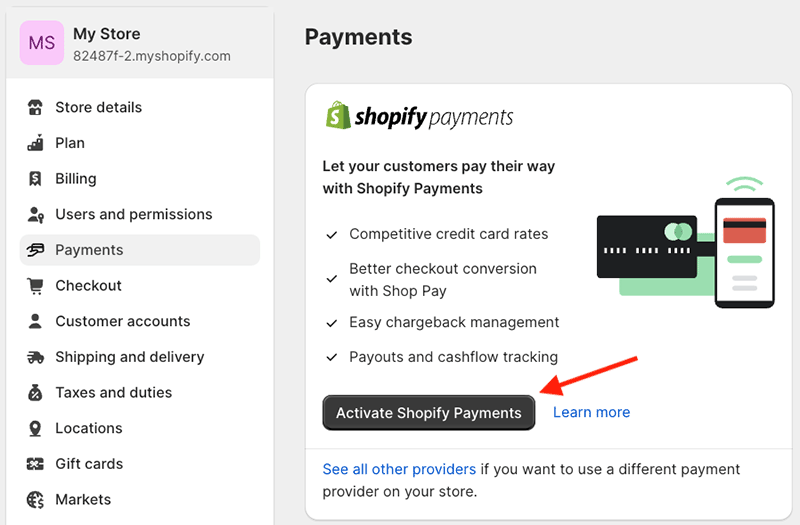
Additionally, there’s a credit card rate to factor in — in the US, depending on your plan, you can expect to pay a credit card processing fee of between 2.5% and 2.9% of each sale made on your online store.
Other payment gateways
The other way to accept payments in Shopify is by using a third party ‘payment gateway’ — of which there are over 100 to choose from.
If you do this however, Shopify will apply a transaction fee to each sale. On the ‘Basic’ plan or higher, this will be be up to 2%, depending on the plan you’re on (5% on the Starter plan).
So, unless you’ve got a very good reason not to, using the built-in ‘Shopify Payments’ payment processor will usually be the most cost-effective option.
However, you should note that Shopify Payments is only available to users based in certain countries (these include many EU countries, major English-speaking markets, Switzerland, Hong Kong and Japan).
Real-life Shopify user reviews
So far in this review, you’ve heard my views on Shopify. But as part of my research for the piece, I interviewed some Shopify users to get their take on the platform. So, here are some ‘real life’ takes on Shopify from some of its customers:
“I have used Shopify to build several successful ecommerce stores. Previously I had used WooCommerce, but in the last few years Shopify has just become the de facto choice. Its ecosystem, functionality, support and and ease of use make it fundamentally so much better than any of the other options. I won’t consider using anything else for a new project.
In terms of the downsides of Shopify, I find the site editor a bit harder to use than I’d like, and setting up on-page SEO is not as straightforward as in WordPress.”
– Ian Clifford, DJtechreviews.com
“We’ve been using Shopify POS for around 5 years now. For the most part, it is easy to use, reasonably priced and reliable. It’s been quite straightforward to set up.
However, we have had issues with updates running during the day when we are trading, occasionally leaving us unable to take card payments, and this has resulted in lost sales.”
Liz Jones, ziggysgiftshop.co.uk
“I use Shopify to run the store for the art rock band Five Grand Stereo. On the whole it’s a great solution for selling their merchandise, and it’s particularly good for bundling physical and digital products together.
I’d like to see a better site editor added to Shopify however. The way that the drag-and-drop tool works is a bit strange — other than the home page, it doesn’t let you edit individual pages, just templates. I worked out what to do eventually but it took me longer than I’d like.”
Emma Finnigan, fivegrandstereo.com
“I’ve been using Shopify for a good few years now and I’m going to stick with it. I like that it’s really easy to use, and the theme I used to build my site has stood the test of time.
The blogging part for me is a big plus because it’s worked pretty well for my SEO and it’s where I send my email newsletter links to as well. I just wish it was easier to reply to a user’s comments.
I also find it a bit frustrating that Shopify’s support for offering digital product downloads comes via an official extra app they’ve created. It’s a bit clunky and takes a lot of clicks to do even basic things like generate a new download link.
That said, all the functionality I need is available either built into Shopify or as an extra app, so it’s definitely a platform that has worked well for me and I’d recommend it to others.”
Diarmaid MacMathuna, cruinneog.com
Shopify review: conclusion
Overall, Shopify is one of the best hosted solutions for those wishing to create an online store, and arguably the best for anyone who wants to use one product to sell online AND in a physical location. It’s also an extremely good solution for users who want to dropship, run a print-on-demand business or sell products in multiple currencies.
The product is competitively priced, particularly when you consider that abandoned cart saver functionality and multilingual tools — features that many other platforms charge a premium for — are included on most plans.
It’s also easy to use, integrates well with a huge number of other apps, and its templates are attractive.
And it has a very big user base, which inspires confidence.
All in all, Shopify is a very good option for anyone hoping to start a business, or existing small businesses wishing to take their product offering online — but there are some disadvantages of using Shopify to be aware of too.
The main one to watch out for is the transaction fees applied to merchants using a third-party payment gateway (many of Shopify’s competitors don’t charge any transaction fees at all, regardless of the payment processor used).
Second, Shopify’s limit of three options per product isn’t ideal, nor is its lack of a built-in tool for collecting custom data from customers at checkout.
Third, Shopify’s multi-currency selling features, while generally very good, don’t work with third-party payment gateways — and the new restriction placed on custom pricing features isn’t ideal.
And finally, the number of user accounts you get on each plan is not at all generous, especially when you compare these limits to those of completing platforms. (For me, this is one of the sneakiest aspects of Shopify’s pricing structure.)
A more complete summary of Shopify pros and cons follows below, but as always we strongly recommend that you try before you buy — it’s worth having a good play with the platform via the Shopify free trial. You can access this here.
And of course if you have any questions or feedback on the platform, do leave them in the comments section at the end of this post.
Shopify pros and cons summary
Reasons I think you should use Shopify
- It’s very easy to use.
- It supports a large range of external payment gateways.
- Shopify templates are attractive and fully responsive (mobile, desktop and tablet friendly).
- It’s a particularly good option for anyone interested in dropshipping or print on demand.
- True multi-currency selling is possible with Shopify — something that can’t be said for a lot of competing platforms.
- The point-of-sale options are comprehensive and work well.
- It gives you sophisticated and affordable abandoned cart recovery tools.
- Its automatic tax calculation tools are excellent (particularly where VAT MOSS is concerned) and have the potential to save merchants a lot of time and admin.
- You can use any Shopify plan (except ‘Starter’) to create versions of your store in up to 20 different languages.
- You can avail of generous shipping discounts if you use the built-in ‘Shopify Shipping’ service.
- The ‘Buy Button’ feature allows you to use Shopify to add a shopping cart easily to any website or online business presence.
- It gives you generous email marketing features.
- You can extend Shopify’s core functionality easily thanks to a huge range of apps and integrations.
- Shopify’s SEO features are good, and you can use Yoast with the platform.
- ‘Starter’ plan aside, there are no transaction fees if you are happy to use the built-in payment processing system, Shopify Payments.
👉 You can try Shopify for free here >>
Reasons I think you should avoid Shopify
- The number of user accounts you get on each plan is extremely ungenerous and may quickly force you onto an expensive plan that you might not otherwise need (this is especially the case with the ‘Basic’ plan).
- The number of free themes provided, 13, is quite low compared to the number offered by competing online store builders.
- The template editor could be better.
- While you can create 100 variants of a product, these can only involve up to 3 product options.
- Shopify Plus plan aside, there’s no phone support.
- Despite boasting very strong multi-currency selling features, Shopify’s new limits on the number of ‘markets’ you can create are not ideal — they significantly restrict your ability to create custom pricing rules for individual countries.
- Key functionality that you might expect to be provided out of the box often requires installation of a paid-for app.
- Adding custom fields such as text boxes or file upload options, while doable, is unnecessarily complicated.
- Shopify’s built-in payment processor, Shopify Payments, only allows you to sell from certain countries.
- The built-in multi-currency feature is only available if you are a Shopify Payments user.
- You can’t avoid transaction fees if you use a third-party payment gateway.
- Transaction fees on the ‘Starter’ plan are very high (5%).
- Product images have to be uploaded with the same aspect ratio to display neatly alongside each other.
- When using a dropshipping app, it’s hard to be sure that the goods you’re selling are ethically produced.
- If you’re not using ‘Shopify Shipping’ to provide real-time carrier quotes to your customers, or live in a country where it’s not available, getting your hands on this functionality can prove expensive.
👉 You can try Shopify for free here >>
Overall score: 4.5 out of 5
Shopify alternatives
There are lots of alternatives to Shopify available.
Of the ecommerce solutions I’ve tested to date, I’ve found that BigCommerce is probably the closest / strongest alternative to Shopify. The key advantage that it has over Shopify is the option it gives you to build multiple stores with one account (something that is only possible on an expensive ‘Shopify Plus’ plan).

For more information on the product and how it stacks up against Shopify, do check out our BigCommerce review and our BigCommerce vs Shopify comparison.
If you need more flexibility with regard to how you lay out content, or have a particular need to showcase images, videos or blog posts, you might like to check out Squarespace, which has a really lovely approach to managing content. Its drag-and-drop editor is significantly better than Shopify’s.
You’ll need to bear in mind that Squarespace’s ecommerce functionality is more limited than Shopify’s, however — particularly where multi-currency selling and point-of-sale ecommerce are concerned. But for an ecommerce beginner with simple selling needs, it’s great.
Check out our Squarespace review, Squarespace pricing guide and Shopify vs Squarespace comparison for more details on this platform.
Webflow is also an interesting option for users who want a huge degree of control over layout. To see how it stacks up against Shopify, you can read our Webflow vs Shopify comparison. You can also check out our Webflow review, Webflow vs Wix shootout and Squarespace vs Webflow comparison for more details on this platform.
If international selling is important to your business, PrestaShop might be a good option for you. Although not as easy to use as Shopify, it provides users with a lot of flexibility when it comes to selling in multiple currencies, site translation and tax calculation. Take a look at our PrestaShop vs Shopify comparison for more details.
You might also be wondering whether online marketplaces like Etsy, eBay and Amazon are good options for starting an ecommerce business. If so, take a look at our Shopify vs Etsy comparison, our Shopify vs eBay comparison and our Shopify vs Amazon comparison for more details on how selling on platforms like these compares to using a standalone store builder.
If you already run a website, you might like to investigate Ecwid, which allows you to add an online store to an existing site (Ecwid offers similar functionality to Shopify’s ‘Buy Button’, but with more advanced features). You can read our full Ecwid review or our Ecwid vs Shopify comparison for more information on this product.
If you are on a low budget, then Wix, Big Cartel, GoDaddy and Jimdo are worth a look, as they offer selling tools at a cheaper price point.
However, as with Squarespace, these products are more ‘general purpose’ website builders and consequently are rather more limited in terms of ecommerce functionality than Shopify.
Check out our latest Wix review and our Wix pricing guide for more information about Wix; our Wix vs Shopify, Squarespace vs Wix and Wix vs WordPress comparisons will also help you decide whether the platform is for you.

If POS functionality is a key concern, Square Online may potentially be a good fit for you — this solution lets you build a pretty decent online store but also gives you access to a sophisticated range of POS hardware and features (some of which can be used for free). Check out our Shopify vs Square comparison for more details.
And finally, there’s always self-hosted WordPress. This is a different beast to Shopify in that it is not a ‘hosted’ solution: using it involves building your own site and buying server space to host it on. (Our Shopify vs WordPress comparison goes through this process in more depth).
However, there are LOTS of plugins available that let you sell your products using WordPress — with WooCommerce being the preferred option for many.
Shopify review FAQ
What’s the best value Shopify plan?
It really depends on your selling requirements, but for me the ‘sweet spot’ plan is probably the mid-tier ‘Shopify’ plan as it gives you the bulk of functionality you need for an online store, including professional reports, full control over multi-currency payments and store translation features.
Does Shopify charge transaction fees?
You can avoid transaction fees by using Shopify’s built-in payment gateway, Shopify Payments. However, if you use a third-party payment gateway, Shopify charges you a transaction fee of up to 2%, depending on your plan.
Do I need any special hardware or software to use Shopify?
Building a standard Shopify store can be done on any sort of desktop computer, and doesn’t require you to install any software locally. It doesn’t matter whether you’re using a Mac, PC or Chromebook — all you need is a web browser and access to the internet to build your store. If you are selling at point of sale however, you will usually need to invest in some hardware, like a card reader, receipt printer or till.
Can I sell video content on Shopify?
Yes — you can use Shopify’s free ‘Digital Downloads’ app to do this, but you might find that a dedicated third-party app like Sky Pilot works better (particularly if your customers need to stream your content).
Can I create multilingual versions of my Shopify store?
Yes. With the exception of ‘Shopify Starter,’ all plans let you create up to 20 different language versions of your store.
Can I sell in multiple currencies with Shopify?
Shopify’s built-in multi-currency feature lets you sell in over 130 currencies — but it is only available if you are using Shopify Payments as your payment gateway. If you are based in a country that doesn’t yet support Shopify Payments, you can still sell in multiple currencies, but you will need to use a third-party app to do so.
Is it easy to upgrade or downgrade my Shopify plan?
Yes, you can do this at any time. The price of your previous plan is prorated and applied against the cost of your new subscription.
Should I use a free or paid-for Shopify template?
For most new merchants, a free Shopify template will work perfectly fine — the bundled templates are attractive and their visuals can be easily tweaked to make your storefront consistent with your brand. It’s also worth bearing in mind that the free templates are all fully supported by Shopify; if you use a paid-for theme, you may need to source support from a third-party developer. That said, some of the paid-for options can provide a more ‘bespoke’ look for your online store.
What’s the best alternative to Shopify?
There are lots of alternatives available to Shopify — we discuss some of them in depth above. However, for us, the most similar ‘hosted’ product in terms of pricing and basic features is probably BigCommerce. In terms of self-hosted / open source competitors, WooCommerce is the strongest alternative to Shopify we’ve tested to date.
About the Author